 rifanmuazin
A pioneering solution for advanced LinkedIn content management has been developed by a dedicated content creator, leveraging Buffer’s recently released API to build a sophisticated web application dubbed the "LinkedIn Content Library & Analyzer." This innovative tool addresses a long-standing challenge faced by social media professionals and content strategists: the inability to comprehensively search, analyze, and strategically repurpose their extensive LinkedIn post history. The bespoke application, hosted on Lovable, transforms an otherwise static archive into a dynamic, intelligent resource for future content creation and audience engagement.
The Growing Challenge of Content Archiving and Discovery

In an era where personal branding and professional networking on platforms like LinkedIn are paramount, content creators frequently publish hundreds, if not thousands, of posts. While social media management tools like Buffer excel at scheduling and publishing, and even facilitating engagement, a significant void has existed in the ability to effectively manage and derive insights from a burgeoning back catalog of published content. Creators often find themselves grappling with vague memories of past posts, leading to unintentional repetition, missed opportunities to expand on successful themes, or the abandonment of valuable ideas due to an inability to quickly verify past coverage. The absence of robust native search or filtering capabilities within LinkedIn itself, and its primary scheduling partners, has exacerbated this problem, turning a wealth of information into an invisible asset.
This challenge is particularly acute given the sheer volume of content being generated daily across professional networks. Industry reports indicate that content marketers spend an average of 4-6 hours weekly on content planning alone, with much of that time dedicated to brainstorming and research to avoid redundancy and identify fresh angles. Without an efficient system to review their own historical data, content creators risk diminishing returns on their efforts, struggling to identify patterns in engagement, popular topics, or unique positioning statements that have resonated with their audience. The need for a more intelligent, data-driven approach to content strategy has become increasingly evident, pushing innovative users to seek custom solutions.
A Novel Solution: The LinkedIn Content Library & Analyzer

Recognizing this critical gap, a content strategist embarked on building a custom web application designed to unlock the latent value within their LinkedIn post history. The "LinkedIn Content Library & Analyzer" connects directly to Buffer’s API, pulling in a comprehensive record of published posts. This integration provides four critical functionalities previously unavailable: a searchable and filterable post library, an AI-powered chat for deep content analysis, a saved chat history for ongoing reference, and an analytics dashboard focused on content performance by tags and media types. Crucially, the application also allows for the refinement of AI-generated content ideas and their direct saving back into Buffer’s Create space, establishing a seamless, closed-loop content workflow.
The development of this tool underscores a broader trend in the digital ecosystem: the empowering potential of APIs. Buffer’s decision to release its API in beta opened the door for users to extend its capabilities, enabling personalized integrations that cater to highly specific needs. This developer’s journey began with the realization that such an API could transform a wish-list feature – the ability to search one’s own content – into a tangible reality.
The Development Journey: From Concept to Custom Application

The path to building the LinkedIn Content Library & Analyzer involved a careful evaluation of potential platforms and methodologies. Initial considerations included:
- Automation via Notion and Zapier: This workflow, while capable of automating certain tasks, proved inadequate for historical data ingestion and robust search. The primary limitation was the inability to pull in an extensive back catalog of posts and the restriction of search functionality to Notion page titles rather than the rich content of the LinkedIn posts themselves. This would have necessitated a lengthy period to build a meaningful data set and still not deliver the desired analytical depth.
- Large Language Models (LLMs) like Claude: Integrating directly with an LLM like Claude was initially appealing due to its powerful analytical capabilities. Many within the Buffer community had explored using LLMs for content workflows. However, direct integration presented challenges related to maintaining context across various chats and the need to develop a separate "artifact" or feature requiring the Anthropic API for a browsable library and a clean user interface. The goal was a dedicated, focused environment, not an embedded feature within a general-purpose chat application.
Ultimately, the developer chose Lovable as the platform for the custom application. Lovable emerged as the optimal choice due to its accessibility for building custom apps without requiring traditional coding expertise, streamlining the process of connecting to Buffer’s API and handling backend complexities. This low-code/no-code approach allowed the developer to focus on the application’s functionality and user experience rather than intricate coding. The initial bare-bones version of the post library and AI chat screen was reportedly built in a single day, with subsequent feature additions and refinements over two months to reach its current comprehensive state. This iterative development process highlights the agility afforded by modern development platforms and well-designed APIs.
Core Functionalities: A Deep Dive into the Application’s Screens

The LinkedIn Content Library & Analyzer is structured around four primary screens, each designed to serve a distinct purpose in content management and analysis:
-
The Post Library: This serves as the central repository, offering a searchable and filterable view of every LinkedIn post published since 2023. Currently housing approximately 220 posts, with 150 from the last year alone (reflecting the developer’s increased focus on LinkedIn presence), the library allows users to search by keyword and filter by date range or custom tags. This granular control enables highly specific queries, such as identifying all posts about "systems that help me focus" published within the last six months, or posts discussing "remote work" that include an image. The ability to combine search and filter criteria drastically improves content discovery. Furthermore, users can add notes to individual post cards, which the AI chat then incorporates into its analysis, enriching the context for future content generation. Direct links to original posts within Buffer also enhance workflow efficiency.
-
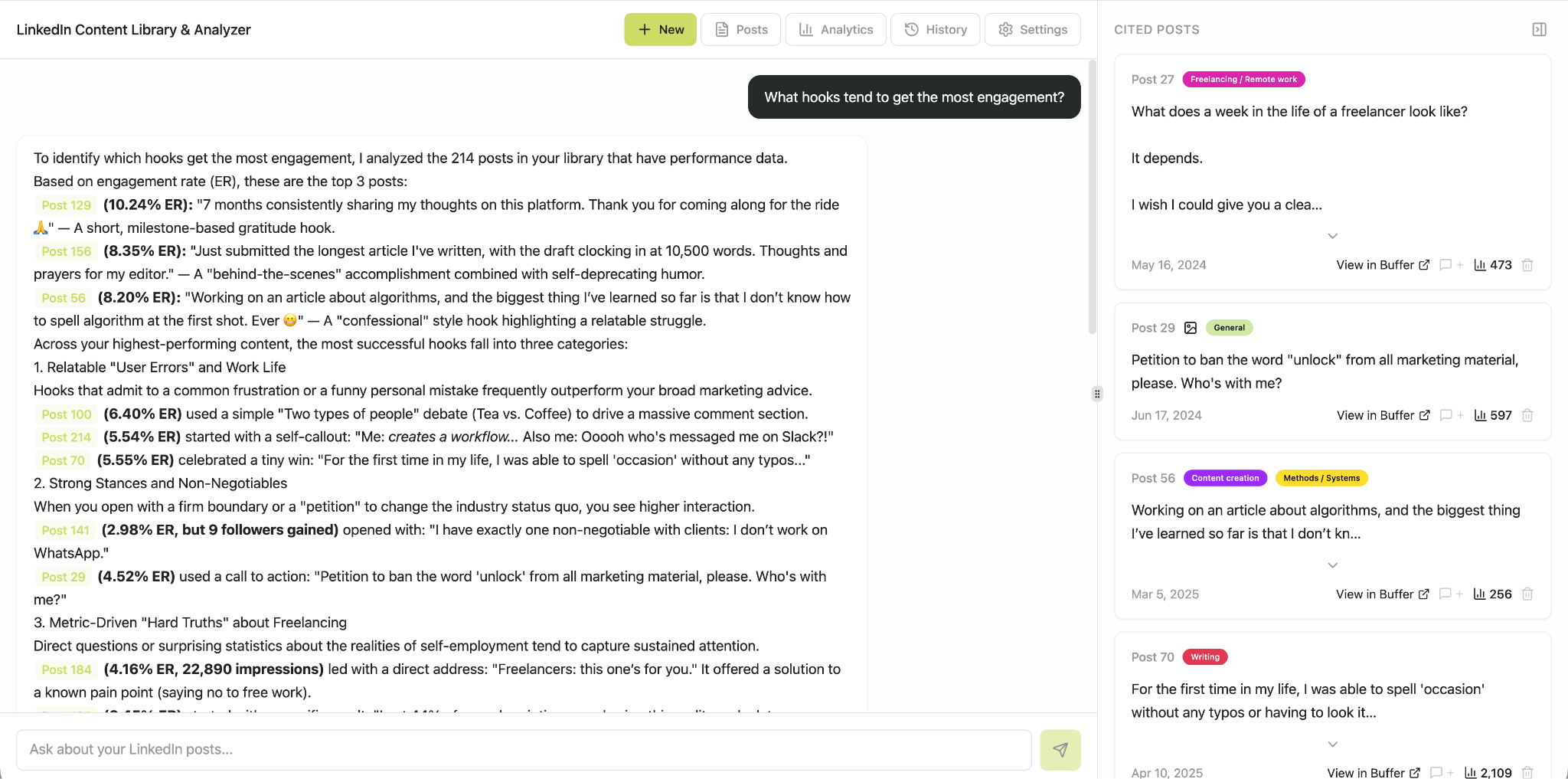
The AI Chat: This is the analytical heart of the application, where users interact with an AI model to pose specific questions about their content. The AI analyzes the selected posts from the library, providing insights and answers, complete with references to specific historical posts. This feature has proven invaluable for understanding the evolution of the developer’s professional positioning, identifying dominant topics, recognizing which themes and hooks resonate most with the audience (and conversely, which do not), and pinpointing gaps in content coverage. Beyond analysis, the AI also proactively suggests new post ideas, which can be directly saved back to Buffer.

-
Chat History: To ensure continuity and prevent loss of valuable insights, every conversation with the AI chat is saved. This allows users to revisit past analyses, pick up follow-up questions, and review ideas that may not have been immediately saved but warrant a second look later. This historical record acts as a continuous learning repository, building on previous interactions.
-
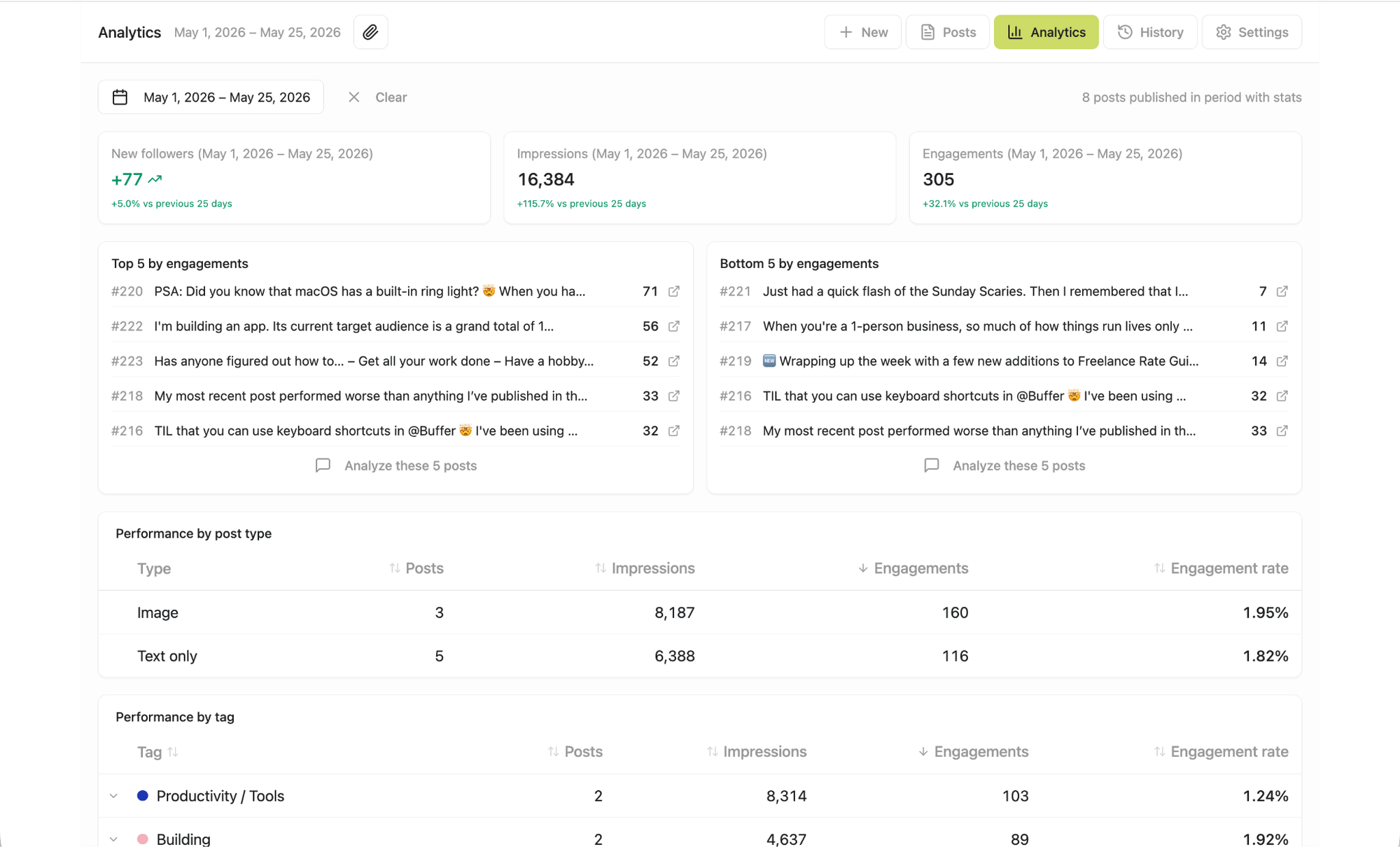
Analytics: The newest addition to the application, the analytics screen provides a visual overview of content performance, broken down by user-assigned tags and post/media types. While Buffer’s native Insights feature offers comprehensive post and account performance data, this custom analytics screen focuses on revealing patterns related to content categories and formats. For instance, it can illustrate whether certain topics consistently achieve higher engagement, if posts with images outperform text-only updates, or if there’s an over-reliance on specific themes. Currently, integrating performance metrics into the app requires a manual workaround, exporting data from LinkedIn and matching it to posts in the library, as the Buffer API does not yet offer direct analytics data sync. This highlights an area for potential future API enhancement.
Closing the Loop: From Insight to Action
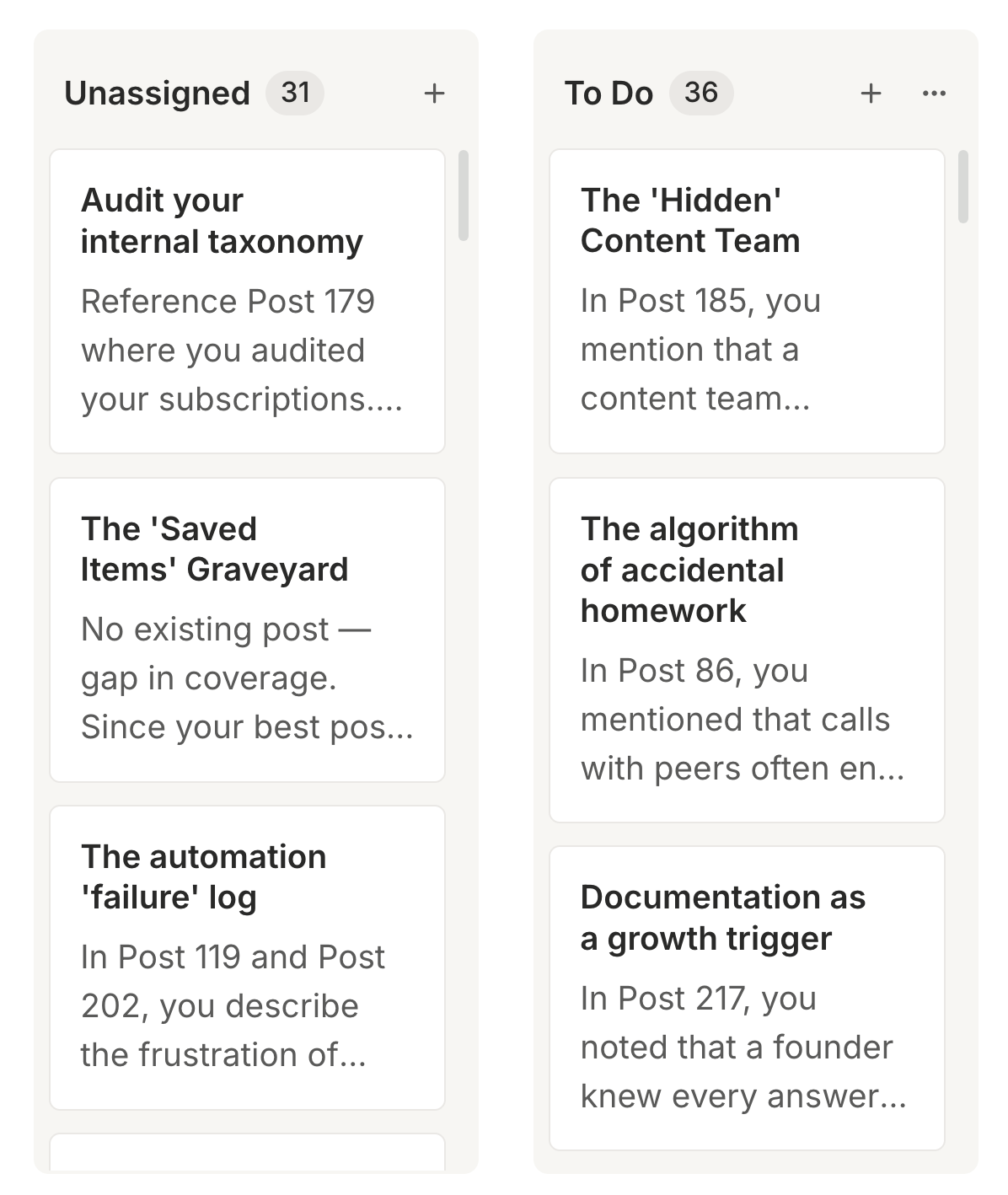
One of the most powerful aspects of this custom application is its bidirectional integration with Buffer. The insights generated by the AI chat are not merely analytical; they are actionable. When the AI proposes a new content idea, the user can refine it within the app and, with a single click, save it directly to Buffer’s Create space. This seamless transfer eliminates friction in the content creation process, ensuring that inspiration is immediately captured and integrated into the workflow.
The developer reports having already saved over 30 content ideas to Buffer, ready for development into full posts. The AI’s ability to provide relevant, data-backed ideas, drawing from historical performance and thematic analysis, is particularly potent for content repurposing without redundancy. A standout feature is the "buried seed" idea generation, where the AI identifies a passing mention in an older post and suggests how it can be expanded into a standalone, fully-fledged piece of content. For example, an eight-month-old post noting the preference for Zoom interviews over email because "their eyes light up when they’re talking about something they’re passionate about" led the AI to propose a new post idea: "Propose a post about why losing these non-verbal cues in async work is the biggest hidden cost of the remote operations model." This demonstrates the AI’s capacity to unearth profound thematic connections and generate genuinely novel content angles from existing material.
Transformative Impact on Content Strategy
The LinkedIn Content Library & Analyzer has fundamentally reshaped the developer’s content strategy. Previously, content ideation was largely reactive, driven by current work projects, which often led to a feeling of "starting from scratch" with each new post. Now, the app provides a robust framework for combining timely topics with data-backed insights into audience preferences and past performance. The ability to ask direct questions like "What opinions have I shared about remote work?" and receive answers supported by specific posts offers an unprecedented level of strategic clarity.
Furthermore, the analytical capabilities of the app reveal subtle patterns and gaps in content approach. The realization that remote work posts "generally focus on the psychological and operational friction of working outside a traditional office" provides a valuable perspective for future content planning, encouraging diversification or deeper exploration of these specific angles. This level of self-awareness in content creation is a significant advantage in maintaining a consistent, engaging, and impactful LinkedIn presence. The next step for the developer involves leveraging these 30+ new ideas through content batching to fill the Buffer queue efficiently.
Broader Implications and the Future of Custom Content Tools
This case study exemplifies the power of APIs and low-code platforms in empowering individual creators and small teams to build highly specialized tools tailored to their unique workflows. Every published post, regardless of platform, contains a wealth of latent ideas, positioning signals, and content seeds. Buffer’s API, by exposing this data, enables users to move beyond generic content management toward intelligent, data-driven content strategy.
The rapid development cycle – an MVP in one day, full features in two months – highlights the accessibility of modern development tools like Lovable and Replit. These platforms democratize the ability to create bespoke software, reducing the reliance on extensive coding skills. For others considering similar projects, the key takeaways are a clear understanding of the desired functionality, thoughtful iteration, and a willingness to troubleshoot. Even without building a full application, users can achieve some benefits by connecting their Buffer account to an LLM directly for basic content analysis, demonstrating the spectrum of possibilities enabled by accessible APIs.
As the digital content landscape continues to evolve, the demand for personalized, efficient, and intelligent content workflows will only grow. Solutions like the LinkedIn Content Library & Analyzer represent a significant step forward, showcasing how custom integrations, powered by robust APIs and AI, can transform how professionals manage, analyze, and strategically leverage their digital footprint. It positions the content creator not just as a publisher, but as a data-driven strategist, ready to maximize the impact of every piece of content.