 Ali Ikhwan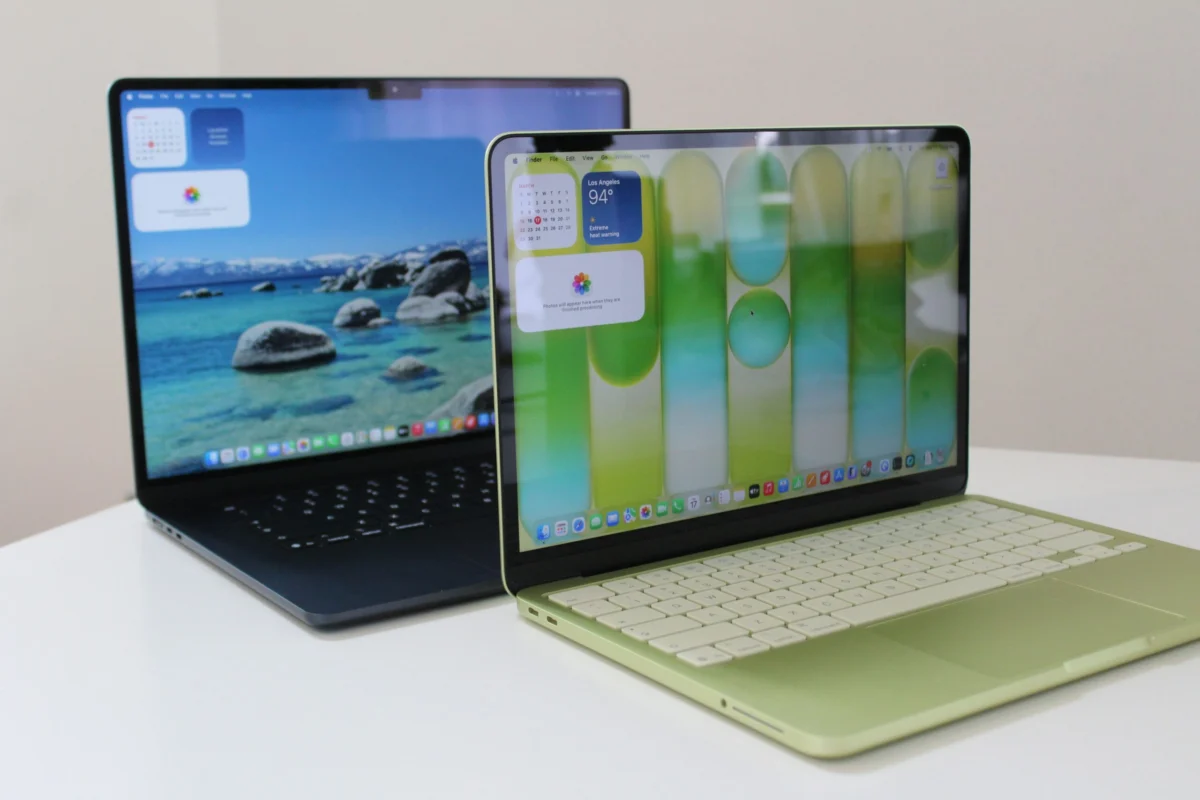
The landscape of portable computing has undergone a significant shift with the introduction of the MacBook Neo, a device designed to sit alongside the established MacBook Air as a more affordable entry point into the macOS ecosystem. With a price differential of $500, these two laptops represent different philosophies regarding performance, longevity, and user intent. While the MacBook Air remains the gold standard for mainstream professional and creative work, the MacBook Neo emerges as a specialized tool for casual users, students, and those seeking a secondary device. Deciding between the two requires a granular understanding of how internal hardware, thermal management, and connectivity options translate into daily productivity.
The Evolution of the Apple Silicon Lineup: A Brief Chronology
To understand the current positioning of the MacBook Neo and the MacBook Air, one must look at the trajectory of Apple’s hardware transitions over the last several years. The shift began in November 2020 with the introduction of the M1 chip, which unified the architecture across the Mac lineup and delivered unprecedented efficiency. By 2022, the MacBook Air received its first major redesign in a decade with the M2, introducing the "Liquid Retina" display and the controversial camera notch.
In 2024 and 2025, Apple focused on refining the M3 and M4 architectures, pushing the limits of 3-nanometer processing. However, market analysis indicated a gap in the sub-$800 category, where the iPad Pro and high-end Chromebooks were capturing users who desired a traditional clamshell form factor but did not require the heavy-duty processing power of the M-series chips. This led to the 2026 release of the MacBook Neo, which repurposed the A-series architecture typically found in iPhones for a laptop environment. Simultaneously, the MacBook Air moved to the M5 platform, further distancing itself from the entry-level tier by doubling base memory and storage to meet the demands of modern generative AI workflows.

Technical Specifications and Hardware Architecture
The core distinction between these two machines lies in their "brains." The MacBook Air utilizes the M5 chip, a powerhouse designed for sustained multi-core performance and advanced graphical tasks. In contrast, the MacBook Neo utilizes the A18 Pro, a chip primarily optimized for the power-constrained environment of a smartphone.
| Feature | MacBook Air (M5, 2026) | MacBook Neo |
|---|---|---|
| Processor | Apple M5 (10-core CPU/GPU) | Apple A18 Pro |
| Base Memory | 16 GB Unified Memory | 8 GB Unified Memory |
| Storage | 512 GB SSD (Base) | 256 GB SSD (Base) |
| Display Size | 13.6-inch or 15.3-inch | 13.0-inch |
| Connectivity | 2x Thunderbolt 4, MagSafe 3 | 2x USB-C (1x USB 2.0) |
| External Displays | Up to two 5K monitors | One 4K monitor |
| Starting Price | $1,099 | $599 ($699 with Touch ID) |
While the A18 Pro is a highly capable mobile processor—outperforming many older Intel-based laptops—it faces a significant hurdle in the MacBook Neo: memory. The Neo is limited to 8 GB of RAM with no option for expansion. Industry data shows that macOS Sequoia and subsequent versions utilize approximately 6 GB of RAM simply to maintain background AI tasks and system stability. This leaves very little "headroom" for intensive applications. The MacBook Air’s transition to a 16 GB base configuration reflects the growing resource requirements of modern web browsers and productivity suites.
Performance Analysis: The RAM and Port Bottlenecks
In laboratory and real-world testing, the M5 MacBook Air demonstrates a clear advantage in multitasking. Loading dozens of browser tabs while running video conferencing software and background synchronization tools rarely causes the system to stutter. The M5’s high-bandwidth memory architecture ensures that data moves quickly between the CPU and GPU, which is essential for creative tasks like 4K video editing or high-resolution photo manipulation.
The MacBook Neo, however, is susceptible to "memory pressure" when pushed beyond casual use. While the A18 Pro chip itself is snappy for opening individual apps, the 8 GB limit means the system must frequently rely on "swap memory"—using the internal SSD as temporary RAM. This can lead to minor lag when switching between heavy applications.

Furthermore, the Neo’s connectivity suite presents a hurdle for professional workflows. One of its two USB-C ports is limited to the USB 2.0 standard, which offers data transfer speeds of just 480 Mbps. For comparison, the Thunderbolt 4 ports on the MacBook Air offer up to 40 Gbps. Users who frequently move large files from external drives or high-speed cameras will find the Neo’s ports frustratingly slow. Additionally, the Air’s support for dual external displays makes it a viable desktop replacement, whereas the Neo’s single-display limitation anchors it firmly as a mobile-first device.
Design Philosophy and Multimedia Experience
Apple has taken a distinct aesthetic path with the MacBook Neo. While the MacBook Air maintains the sleek, professional "slab" design in colors like Midnight and Starlight, the Neo embraces a more vibrant palette. Available in Silver, Blush, Citrus, and Indigo, the Neo features rounded edges and white keycaps, reminiscent of the "iBook" era.
One notable design choice in the MacBook Neo is the absence of the notch. By utilizing slightly thicker top bezels, Apple has managed to house the webcam without interrupting the display geometry. For users who find the notch distracting, the Neo offers a cleaner, albeit slightly smaller, 13-inch visual experience.
The multimedia experience also sees a tiered approach. The MacBook Air features a sophisticated four-speaker system with force-canceling woofers, providing a wide stereo soundstage that is impressive for its thinness. The Neo utilizes a standard stereo speaker setup that, while clear, lacks the depth and bass response of its more expensive sibling. Similarly, the 1080p webcam on the Air is backed by a 12-megapixel sensor that significantly improves low-light performance and detail, whereas the Neo’s webcam uses a more basic sensor that can appear grainy in dimly lit environments.

Market Implications and Professional Reactions
Market analysts suggest that the introduction of the MacBook Neo is a strategic move to reclaim the education and "prosumer" secondary-device market. "Apple is effectively segmenting their audience by task duration," notes tech analyst Marcus Thorne. "The Air is for the eight-hour workday; the Neo is for the two-hour evening session. By using the A18 Pro, Apple can maintain high margins at a lower price point while ensuring the device doesn’t cannibalize the Air’s professional user base."
Responses from the education sector have been largely positive. IT administrators in higher education have noted that the Neo’s $599 price point makes it a competitive alternative to high-end Windows laptops for students who primarily need to write papers, manage research, and stream content. However, creative professionals have expressed concerns that the 8 GB RAM limit on the Neo may lead to a shorter functional lifespan, as software updates inevitably become more demanding.
Broader Impact on the Laptop Industry
The existence of the MacBook Neo vs. MacBook Air debate highlights a broader trend in the hardware industry: the "iPad-ification" of the entry-level laptop. As mobile processors become powerful enough to handle desktop-class operating systems, the line between a tablet and a laptop continues to blur.
The MacBook Air (M5) represents the pinnacle of what a fanless, ultra-portable computer can achieve, offering power that rivals the MacBook Pros of just a few years ago. It is a future-proof investment for anyone whose livelihood depends on a computer. The MacBook Neo, conversely, is a lifestyle product. It is a beautiful, portable, and capable machine that excels at the basics but is intentionally hampered to keep it affordable.

Final Assessment: Choosing the Right Model
For the majority of users, the MacBook Air remains the recommended purchase. The $500 premium provides a faster processor, double the memory, significantly faster ports, better speakers, and a superior display and webcam. Most importantly, the 16 GB of RAM ensures that the laptop will remain performant for five to seven years of software updates.
The MacBook Neo is the correct choice for a specific demographic:
- Students: Those who need a reliable, stylish machine for schoolwork and media consumption.
- Secondary Device Users: Professionals who have a powerful desktop or work PC and need a lightweight "couch laptop" for travel or casual browsing.
- Budget-Conscious Casual Users: Individuals whose computing needs do not extend beyond web browsing, email, and streaming services.
Ultimately, the decision rests on whether the user views their laptop as a primary work tool or a digital companion. If it is the former, the MacBook Air is an essential upgrade. If it is the latter, the MacBook Neo offers the most affordable entry point into the Mac experience in over a decade.