
 Ali Ikhwan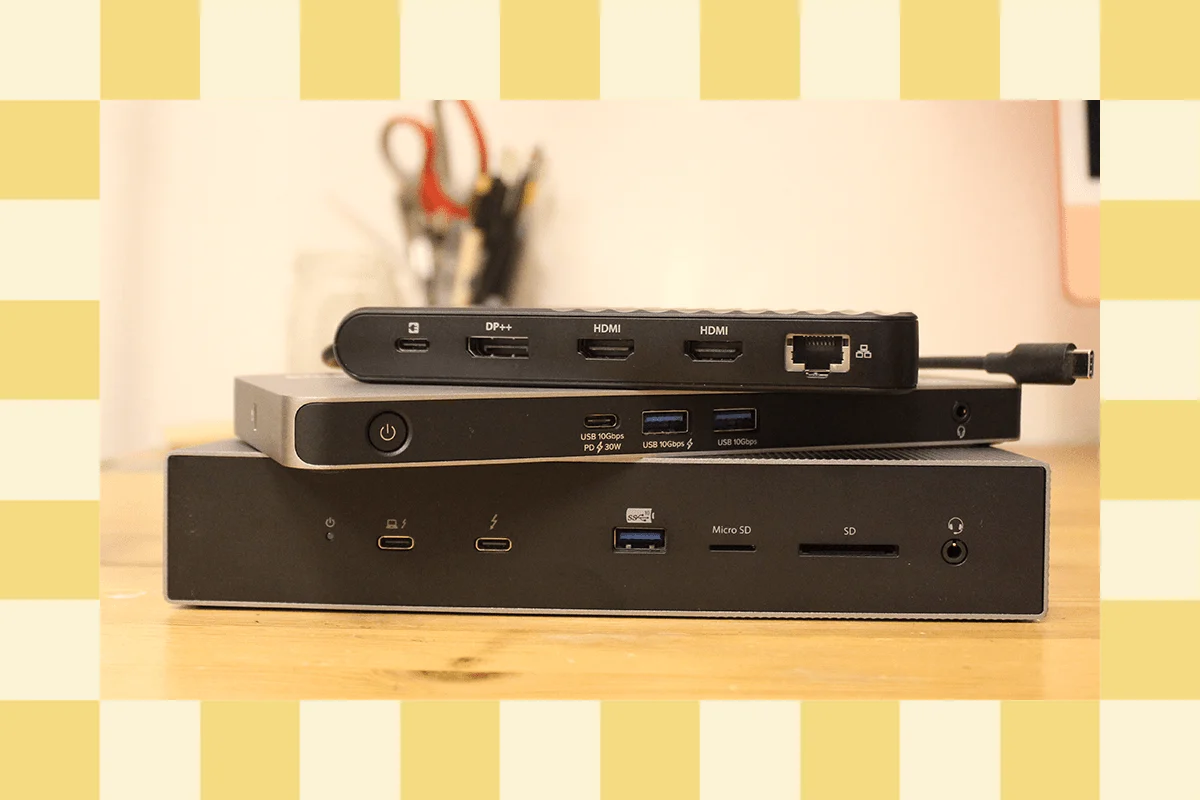
The landscape of modern computing has undergone a significant transformation, with the sleek, port-limited ultrabook becoming the standard for both enterprise and creative professionals. As manufacturers continue to strip away legacy connectivity in favor of minimalist designs, the laptop docking station has evolved from a niche office accessory into an essential component of the contemporary digital infrastructure. While industry benchmarks often focus on high-performance flagships, a robust market of secondary-tier docking solutions offers a diverse range of capabilities tailored to specific, often overlooked, user requirements.
The Evolution of Peripheral Connectivity
The shift toward USB-C and Thunderbolt technology began in earnest around 2015, marking a departure from proprietary docking ports that were once standard in corporate environments. This transition, fueled by the adoption of USB Power Delivery (USB-PD) and the universal nature of the USB-C interface, allowed for the consolidation of power, data, and video signals into a single cable.
By 2020, the proliferation of remote and hybrid work models accelerated the demand for these devices. Data from hardware market analysts indicates that the global docking station market reached a valuation of approximately $1.5 billion in 2023, with a projected compound annual growth rate (CAGR) of 6% through 2030. This growth is driven by the necessity of multi-monitor setups and the requirement for high-speed data throughput in professional workflows.

Comparative Analysis of Current Market Alternatives
While top-tier docks often prioritize raw bandwidth and maximum port density, alternative models frequently provide more targeted value propositions.
The Baseus Spacemate Air 12-in-1 serves as a prominent budget-conscious alternative. Priced at $200, it targets users who require dual 4K display support without the premium cost associated with enterprise-grade Thunderbolt 4 controllers. By utilizing high-bandwidth USB-C protocols, it manages to facilitate a comprehensive desktop experience for users of mid-range laptops, such as the MacBook Air. However, the reliance on integrated cabling—which is non-replaceable—and the lack of high-speed memory card slots reflect the compromises necessary to hit a lower price point.
In the premium segment, the Belkin Connect Pro Thunderbolt 4 dock, retailing at $300, occupies a middle ground between entry-level hubs and ultra-high-end workstations. With 12 ports and 90W power delivery, it is engineered for compatibility with high-performance Windows laptops and modern MacBooks. Its architecture is optimized for stability, though, like many current-generation docks, it retains a mix of USB-A 3.1 and 3.2 ports to maintain backward compatibility with legacy peripherals.
For users prioritizing desk aesthetics and minimalism, the Satechi Thunderbolt 4 Slim Pro Hub offers a different approach. By focusing exclusively on three downstream Thunderbolt 4 ports, it eschews the clutter of legacy ports, providing 40 Gbps of bandwidth per port. This design caters specifically to professionals working with high-speed NVMe storage arrays or external GPU enclosures, where raw data throughput is prioritized over sheer port quantity.

Structural Innovations and Specialized Use Cases
Recent design trends have seen the integration of docking stations into the physical architecture of the workstation. The Satechi Dual Docking Station and Stand, for instance, functions as a structural riser that elevates the laptop for improved ergonomics while providing a hidden bay for M.2 NVMe SSDs. This dual-purpose design addresses the common pain point of limited internal storage in modern ultrabooks, allowing users to expand their storage capacity directly through the dock.
The emergence of the Sonnet Echo 13 Thunderbolt 5 dock represents the industry’s first major steps toward the next generation of connectivity. Thunderbolt 5, which began appearing in consumer hardware in late 2024, introduces significant improvements over its predecessor, including support for three 4K monitors at 144Hz and total bandwidth capabilities of up to 120 Gbps in boost mode. Despite these advancements, the market currently suffers from a lack of Thunderbolt 5-compatible peripherals, such as external storage drives capable of saturating the new interface’s speed.
Technical Considerations for System Integration
The distinction between a "docking station" and a "USB hub" remains a critical point of confusion for consumers. A standard USB hub is essentially a port multiplier, designed for portability and lightweight tasks. In contrast, a true docking station is an active device that typically includes its own power supply unit (PSU), capable of providing enough wattage to charge a laptop while simultaneously powering multiple high-resolution displays and power-hungry peripherals.
A key technical challenge remains the difference in display handling between Windows and macOS. Windows devices typically support Multi-Stream Transport (MST), allowing for multiple extended displays over a single connection. Conversely, macOS historically limits the number of native external displays on non-Pro/Max chips. To circumvent this, manufacturers utilize DisplayLink technology—a proprietary software solution that uses a virtual GPU to drive additional monitors. While functional, industry experts note that DisplayLink can introduce latency and is often unsuitable for high-frame-rate video editing or gaming.

Industry Implications and Future Trends
The move toward universal standards like USB4 and Thunderbolt 5 signals a future where docking stations will become increasingly commoditized, yet simultaneously more powerful. The primary implication for enterprise IT departments is a move toward simplified hardware procurement. As power delivery standards rise—with Thunderbolt 5 capable of delivering up to 240W—the need for separate proprietary laptop chargers will likely vanish, simplifying the "hot-desking" experience in office environments.
However, the rapid iteration of these standards presents a challenge for long-term investment. Users must balance the need for current-generation utility against the inevitable arrival of faster standards. Industry analysts suggest that the current market plateau, where Thunderbolt 4 remains the "sweet spot" for performance and price, will persist for the next 18 to 24 months until Thunderbolt 5 accessories become more widely available and price-competitive.
Summary of Best Practices for Procurement
When selecting a docking station, stakeholders should prioritize the following criteria:
- Host Compatibility: Verify if the laptop supports the required protocol (Thunderbolt 4, USB4, or standard USB-C Alt Mode).
- Power Budget: Ensure the dock’s power delivery (PD) output matches or exceeds the laptop’s requirements, particularly for workstation-class machines.
- Display Configuration: Check specific resolution and refresh rate requirements, as high-refresh-rate displays require significantly higher bandwidth than standard 60Hz panels.
- Thermal Management: For docks with internal SSD storage, such as the Satechi or Sonnet models, consider the device’s passive or active cooling capabilities, as high-speed data transfer generates significant thermal output.
As the industry continues to iterate, the docking station will remain the essential bridge between the mobile professional and the static, high-performance workstation. Whether through the minimalist efficiency of the Satechi Slim Pro or the cutting-edge bandwidth of the Sonnet Echo 13, the diversity of current offerings ensures that there is a viable solution for every segment of the professional market. The challenge for the end user remains in identifying which of these specialized features—storage integration, port variety, or high-bandwidth video support—provides the most utility for their specific operational requirements.