
 Ali Ikhwan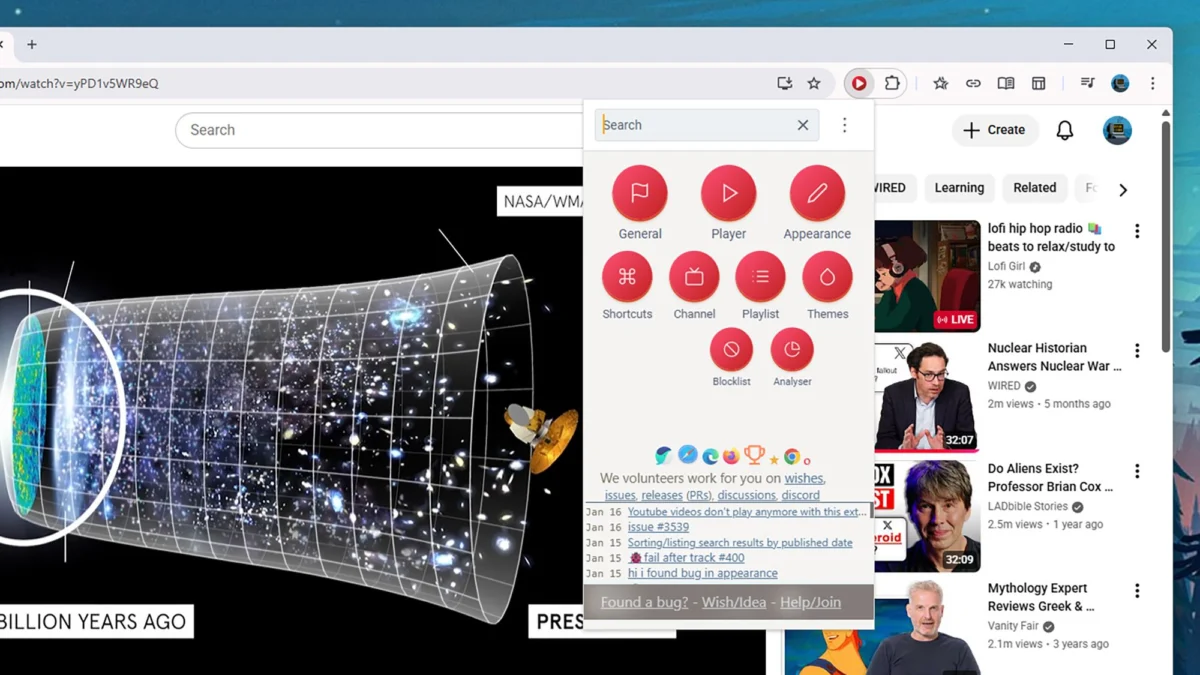
The digital landscape of video consumption is dominated by YouTube, a platform that has evolved from a simple video-sharing site in 2005 to a global behemoth that sees more than 20 million new videos uploaded every single day. According to official figures released by the platform, the sheer volume of content—ranging from wedding speeches and music videos to DIY tutorials, celebrity interviews, and remote wilderness adventures—requires a sophisticated user interface to navigate effectively. While YouTube has introduced numerous native features to improve the viewing experience over the decades, a growing ecosystem of third-party browser extensions has emerged to provide users with a level of granularity and customization that the platform does not offer by default. These tools, primarily designed for Chromium-based browsers like Google Chrome, Microsoft Edge, Opera, and Vivaldi, allow users to tailor the platform to their specific aesthetic and functional needs without interfering with the revenue streams of content creators.
The Evolution of YouTube and the Rise of Browser Customization
Since its acquisition by Google in 2006 for $1.65 billion, YouTube has undergone radical transformations in its user interface (UI) and user experience (UX). The introduction of features like YouTube Shorts, 4K resolution, and live streaming has expanded the platform’s utility but has also led to what many power users describe as "interface bloat." The current YouTube layout is designed to maximize engagement and watch time, often prioritizing algorithmic recommendations over user-defined organization. This tension between platform goals and user preferences has fueled the popularity of browser extensions.
Most of these tools leverage the Chromium engine, which currently powers over 70% of the global browser market. By injecting custom CSS and JavaScript into the YouTube webpage, these extensions can hide unwanted elements, automate playback settings, and reorganize subscriptions. Importantly, the most reputable extensions in this category, such as those discussed below, focus on utility and aesthetics rather than ad-blocking, recognizing the delicate balance required to support the creator economy while improving the consumer’s environment.

Comprehensive Control with Improve YouTube
Improve YouTube stands as one of the most established and feature-rich extensions available for the platform. Its primary appeal lies in its ability to declutter the interface, which has become increasingly crowded with "on-screen furniture" like the sidebar, comment sections, and video thumbnails. For users who find the modern YouTube layout distracting, Improve YouTube allows for the total removal of these elements, creating a minimalist environment focused solely on the video content.
Beyond aesthetics, the extension introduces functional improvements that many users argue should be native to the site. This includes the ability to open search results in a new tab—preventing the loss of progress in a current video—and a reverse-order option for playlists, which is particularly useful for watching chronological series or tutorials. Additionally, the extension offers "smart" features such as automatic video pausing when a user switches tabs and the implementation of custom keyboard shortcuts. By providing a centralized dashboard for these tweaks, Improve YouTube transforms the browser into a professional-grade video player.
Precision Playback via Enhancer for YouTube
While Improve YouTube focuses on the broader interface, Enhancer for YouTube prioritizes the technical aspects of video playback. The extension provides a persistent control bar that gives users immediate access to playback speed, video quality, and volume levels. While YouTube offers these settings within a nested menu, Enhancer brings them to the forefront, allowing for granular adjustments that are essential for power users and educators who may need to cycle through speeds or resolutions quickly.
One of the standout features of Enhancer for YouTube is its theme engine. While YouTube offers a native dark mode, Enhancer provides dozens of variations, allowing users to choose specific color palettes that reduce eye strain or match their operating system’s aesthetic. The extension also includes a "mini player" mode, which allows a video to continue playing in a small, resizable window when the user scrolls down to read comments or search for other content. This multitasking capability is a significant draw for users who treat YouTube as a secondary-screen experience.

Solving Subscription Fatigue with PocketTube
As of 2024, the average YouTube user is subscribed to dozens, if not hundreds, of channels. YouTube’s native subscription management system is often criticized for being rudimentary, offering a simple chronological list that makes it difficult to categorize content. PocketTube addresses this "subscription fatigue" by allowing users to create groups and subgroups for their followed channels.
For example, a user can group all their "Tech News" channels separately from "Cooking" or "Music" channels. PocketTube integrates directly into the YouTube sidebar, appearing as a native feature rather than a third-party add-on. It even allows for the creation of auto-generated playlists for each group and the assignment of custom icons to different categories. By enabling a "Deck mode"—similar to the layout of TweetDeck (now X Pro)—PocketTube transforms the subscription feed into a multi-column dashboard, significantly increasing the efficiency of content discovery.
Focus and Atmosphere: Turn Off the Lights
The psychological impact of interface distractions is the primary focus of the Turn Off the Lights extension. In a standard browsing environment, the area surrounding a YouTube video is filled with white (or dark) space, related videos, and interactive elements that can pull a viewer’s attention away from the primary content. Turn Off the Lights introduces a "cinema mode" that dims the entire webpage, leaving only the video player illuminated.
This extension is highly customizable, allowing users to adjust the opacity of the dimming effect, change the color of the background layer, and even add "atmosphere lighting" or soft glow effects around the video frame. These visual cues mimic the experience of a physical movie theater, helping to improve immersion. Beyond its visual utility, it includes practical features like a mouse-scroll volume control and video filters that can adjust brightness or contrast in real-time, catering to users with specific accessibility needs or varying monitor qualities.

Challenging the Algorithm: DeArrow and the Battle Against Clickbait
One of the more innovative entries in the YouTube extension ecosystem is DeArrow. This tool targets two of the most controversial aspects of modern YouTube: sensationalized titles and misleading thumbnails. To satisfy the YouTube algorithm, creators often use "clickbait" tactics, such as high-contrast thumbnails with exaggerated facial expressions and titles designed to provoke curiosity or outrage.
DeArrow utilizes a crowdsourcing model where users submit more accurate, neutral titles and thumbnails for popular videos. When the extension is active, the sensationalized elements are replaced with the user-submitted versions. If no submission exists, the extension defaults to showing a random frame from the video as the thumbnail and stripping emojis from the title. This experiment in community-driven moderation highlights a growing desire among users for a more honest and less "game-ified" browsing experience. It serves as a factual counter-point to the algorithmic pressures that currently dictate creator behavior on the platform.
Data Analysis: The Impact of Third-Party Enhancements on Retention
Market data suggests that the use of browser extensions significantly impacts user retention on platforms like YouTube. According to digital engagement reports, users who utilize customization tools tend to spend 15% more time on the platform than those who use the default interface. This is attributed to reduced "interface friction"—the frustration caused by difficult navigation or cluttered layouts.
Furthermore, the rise of "productivity-focused" extensions suggests a shift in how YouTube is used. It is no longer just an entertainment hub; it is a primary source of information and education. For the millions of students and professionals who use YouTube for learning, tools that allow for organized subscriptions (PocketTube) and focused viewing (Turn Off the Lights) are essential for maintaining cognitive focus.

Security and Privacy Considerations
While the benefits of these extensions are clear, security experts often warn users to be mindful of the permissions required by such tools. Most YouTube extensions require the "read and change your data on youtube.com" permission to function. While this is necessary for the extension to modify the UI or automate playback, it also means the extension has access to the user’s browsing activity on that specific domain.
Users are encouraged to stick to well-known, open-source, or highly-rated extensions from the Chrome Web Store to mitigate risks. The extensions mentioned in this report—Improve YouTube, Enhancer, PocketTube, Turn Off the Lights, and DeArrow—have long-standing reputations and large user bases, which generally indicates a higher level of scrutiny and safety.
Implications for the Future of Video Platforms
The continued success and evolution of these extensions provide a clear signal to Google and other platform developers: users want more control over their digital environments. The "one size fits all" approach to UI design is increasingly inadequate for a platform as diverse as YouTube. As the creator economy continues to grow, the tension between algorithmic optimization and user-centric design will likely persist.
In the broader context, these browser extensions represent a form of "user-side middleware" that empowers the individual. By allowing users to bypass the psychological triggers of clickbait and the clutter of engagement-focused layouts, these tools facilitate a more intentional and productive relationship with technology. As YouTube moves toward further integration of artificial intelligence and more immersive formats, the role of these third-party "superchargers" will remain vital for those who wish to navigate the 20 million daily uploads on their own terms.